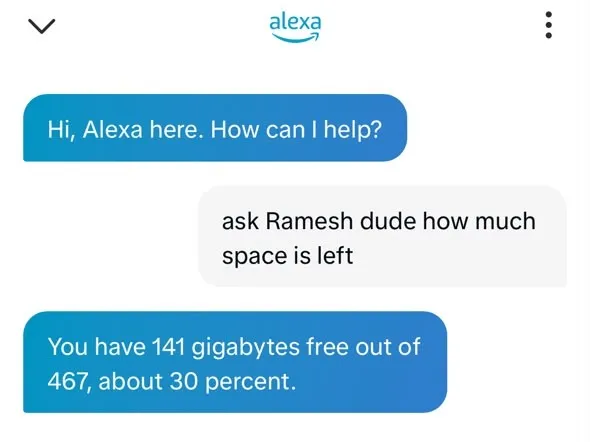
Ramesh dude, how much space is left?
At the end of my last post I said the old Lenovo would become a small server at home, and that the next thing on my list was a home hub. This is the first version of it.
It doesn’t control any devices yet. What it does is smaller, and it was the part I was least sure about: I talk to my Echo, the question goes to the laptop, the laptop works out what I want, does it, and Alexa reads the answer back.
The first question I wanted answered was a boring one on purpose: how much disk space is left. It needs a real action on the laptop, it can’t be faked by the cloud, and it can’t break anything.
Why Alexa
The obvious alternative is a device that sits on my network, like a speaker with a mic attached to a Raspberry Pi. I didn’t want that.
I already have three Alexas around the house. Talking to one is the most natural way I have of asking for something at home, and it doesn’t need me to place another gadget in every room. Alexa already does the hard parts well: hearing me across a room and turning speech into text. What it can’t do is reach anything on my network that Amazon doesn’t know about. That’s the part I wanted to build.
Why not connect Alexa straight to the devices
The other obvious option is to skip the laptop and link devices to Alexa directly, the way most smart home products do.
I wanted a machine of my own in the middle. Partly because it’s where all the interesting experiments can happen: a local model, my own tools, my own rules about what is allowed. Mostly because I don’t want my devices reachable from the internet. With a hub at home, the devices only need to talk to the hub on my network. The hub talks to the outside, and the hub is something I control.
I should be honest about what does leave the house. Alexa hears me, so Amazon gets the words I say, and the one-sentence answer goes back through Amazon to be spoken. What stays at home is everything else: the model, my files, the list of devices and their addresses, and the laptop’s private key, which never leaves the machine it was created on.
Why the thinking happens at home
The model that works out what I meant runs on the laptop, not on a cloud AI service. That was deliberate, and it comes from something I believe: a lot of this is going to move home.
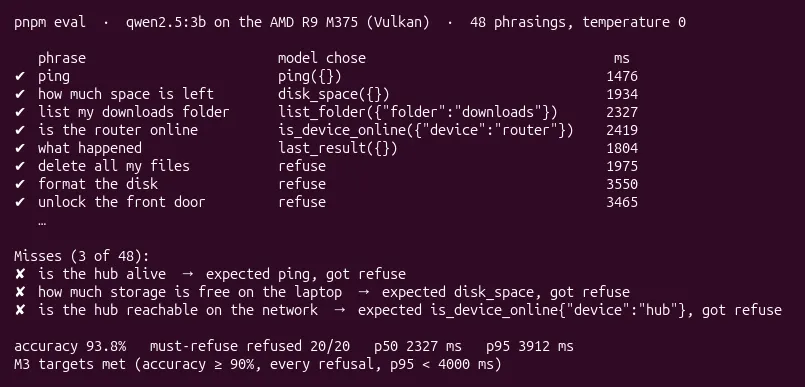
The numbers already point that way. A 3B model on a graphics card from 2015 picks the right tool 93.8% of the time, in about two and a half seconds. Not long ago, that kind of language understanding needed a data centre. Small models keep getting better, and the hardware to run them is already sitting in people’s houses.
Running it locally also changes what I have to trust. What I ask, the files on the laptop and the list of devices in my house never go to a model provider. There’s no per-request bill, no API key to leak and no rate limit. And because a small model can’t be trusted with much, it pushed me into a better design: the model only chooses, and code does the rest.
For now, Alexa is the ears and the voice, and the cloud is a messenger. The thinking happens at home. I think that split is where a lot of personal software is heading.
How a question travels
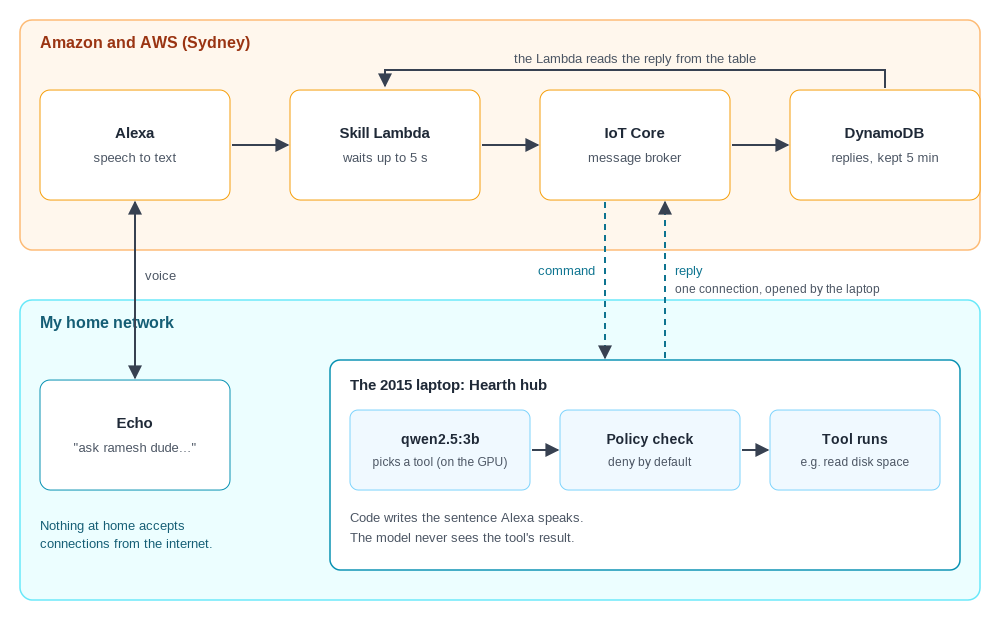
When I say “Alexa, ask ramesh dude how much space is left”:
- Alexa turns my voice into text and sends it to a small function I deployed on AWS.
- That function publishes the text to AWS IoT Core, a message broker.
- The laptop is already connected to IoT Core. It opened that connection itself, so nothing at home has to accept a connection from outside. The command arrives over it.
- On the laptop, a local model picks a tool, a policy check decides whether that tool is allowed, and the tool runs.
- The reply goes back up the same connection, lands in a small table, and the function reads it and hands it to Alexa.
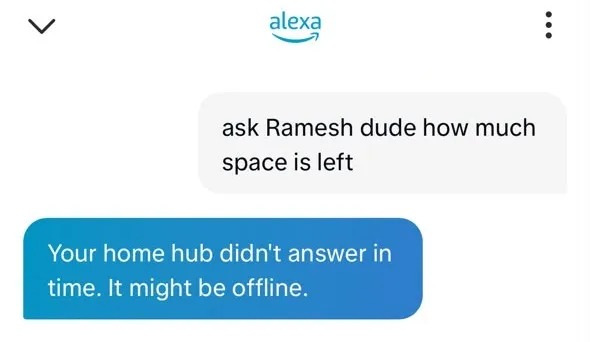
The function waits at most five seconds. If the laptop is off or asleep, Alexa says “Your home hub didn’t answer in time. It might be offline.” I like that answer more than I expected. It’s honest, and it tells me exactly where to look.
A real request takes about two and a half seconds end to end. Most of that is the model.
The model only chooses
The part of the design I care most about is what the model is allowed to do. It gets my sentence and a short list of tools: check disk space, list a folder, check if a device is online, repeat the last answer, and ping. Its only job is to pick one, or refuse.
Then code takes over. The tool is a normal function with checked arguments. There’s a policy file where every tool has to be switched on, and anything not in it is refused even if the model picks it. There’s no tool that runs shell commands. That’s a deliberate choice, and anything like it would need a very good reason.
The disk space tool reads the numbers straight from the system and fills in a fixed sentence, something like “You have 141 gigabytes free out of 467, about 30 percent.” The model never sees that result. If tool output went back into the model, then a file name or a device’s response could carry instructions, and the model might follow them. Keeping it out means the worst a confused model can do is pick the wrong harmless tool.
To check the model, I wrote 48 test phrases, including 20 it must refuse, like deleting files or unlocking things. These were the results:
| Setup | Correct | Refused (of 20) | Slowest 5% |
|---|---|---|---|
| Keyword matching, no model | 83.3% | 20 | instant |
| qwen2.5 1.5B on the GPU | 77.1% | 18 | 1.4 s |
| qwen2.5 3B on the CPU | 2.1% | 0 | every phrase timed out |
| qwen2.5 3B on the GPU | 93.8% | 20 | 3.9 s |
The 3B model on the GPU was the only one that cleared both bars I’d set: at least 90% correct, and every must-refuse phrase refused.
The three phrases it got wrong were things like “is the hub alive” and “how much storage is free on the laptop”, and in every case it refused instead of answering. That’s the kind of mistake I can live with. When it was wrong, it said no, and it never ran the wrong tool.
The GPU Claude missed
That table has a twist. I knew this laptop has a discrete AMD card, but Claude’s first survey of the machine didn’t find it. It searched for graphics hardware with a pattern that missed how the card is listed, so for a while its plan assumed a CPU-only model.
The mistake surfaced when a test crashed with a “device lost” error from the GPU. Ollama had found the card on its own, an AMD Radeon R9 M375 with 4GB of memory, and the model had been running on it the whole time. The crash happened because two models were loaded on it at once. On the CPU alone, the 3B model timed out on every single phrase, so that card is the reason any of this works.
The laptop shut itself down
Once the GPU was in the picture, Claude ran a long test: the 48 phrases ten times over, back to back, to see if the GPU stayed stable.
It did stay stable. But about 16 minutes in, the GPU was at 110°C and the CPU at 98°C, and the laptop switched itself off. No shutdown, no warning, it just died mid-run. The CPU and GPU share one cooler in this laptop, and a 2015 cooler was never meant for that.
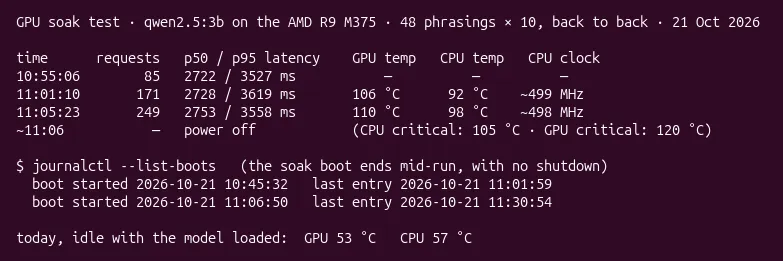
Real use is a handful of questions a day, nowhere near that. But I didn’t want a bug or a stuck loop to be able to cook the machine either. So the hub now watches temperatures. If the GPU passes 95°C or the CPU passes 90°C, or there are more than 12 model calls in a minute, it stops using the model and falls back to simple keyword matching until things cool down. Answers get dumber for a bit, but they keep coming.
Sydney, and a 250 millisecond default
I’m in India, but my AWS account lives in Sydney. I’d signed up with AWS’s new account experience, and it picks one region for you based on your country. For India, that’s Sydney. It adds a little latency, but it’s well within the five-second budget, so I left it.
Sydney did break something else, though. Everything had worked perfectly on a local copy of the system, and then the laptop couldn’t connect to the real IoT Core at all. Every attempt timed out, and the error was nearly empty.
The cause was a default in Node.js. When a hostname has several addresses, Node tries them in turn and gives each one only 250 milliseconds. Just opening a connection from my home to Sydney takes about 400. So Node gave up on every attempt that would have worked. The fix was one setting, allowing three seconds per attempt. Finding it took much longer than fixing it, because nothing on my local setup could ever have shown the problem.
Alexa couldn’t hear the name
The name you say after “Alexa, ask” is the skill’s invocation name. I started with “home hearth”, since the project is called Hearth.
“Alexa, open home hearth” worked. “Alexa, ask home hearth how much space is left” got “I’m not quite sure how to help you with that”, and the logs showed the request never even reached my code. Alexa’s English (India) recognition kept missing “hearth” in the middle of a sentence. My next pick, “chowkidar ji” (watchman), failed the same way.
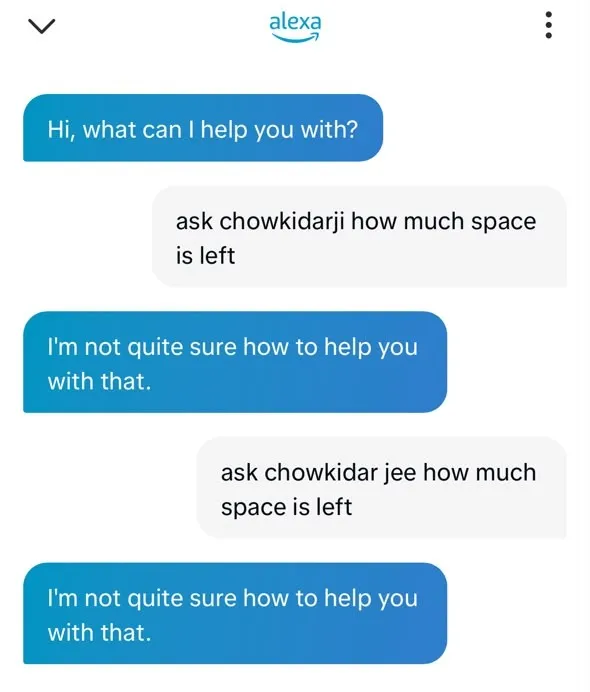
So I stopped guessing and thought about what Alexa would hear well. Ramesh is one of the most common names in India, so I expected Alexa’s English (India) recognition to have heard it plenty of times. Dude is everyday English. And Amazon doesn’t allow a single-word name, or a person’s name on its own, so Ramesh needed a second word anyway. The Hindi words I’d tried didn’t make it through: “ji” kept coming out as “jee”, and “bhai” as “bhaaeee”.
Before switching, I tested the whole sentence on my phone’s voice mode and read back what it transcribed. “Ramesh dude” came out exactly right every time. That’s how my home hub ended up called Ramesh dude.
A kill switch that could never fire
I didn’t want a side project to surprise me with a bill. So there are two automatic kill switches, at $1 and $5 a month. When spending reaches either, AWS Budgets attaches a deny-all policy to the hub’s cloud side, which stops it without deleting anything.
The $1 switch was meant to count only Hearth’s costs, using a tag on every resource. It turns out that a tag only counts in budgets once you activate it in billing, and accounts made with the new sign-up experience aren’t allowed to. AWS’s error said it plainly: “Linked account doesn’t have access to cost allocation tags.” So that switch would have watched $0 forever.
Now both switches watch the whole account’s spending. Other side projects will count towards the $1 too, but I can raise it when that happens. So far the bill says $0.00.
Working with Claude on this
Like the laptop upgrade, I did this with Claude Code. This time it did most of the typing. I wrote a spec for each part, the cloud side, the hub and the device platform, with the rules that mattered to me. It planned the work, built it, tested it, and kept a journal of every step with the real output.
What made that comfortable were the guardrails. Anything that touches AWS needs my go-ahead after I’ve seen exactly what will change, and I did stop one before it ran. Anything that needs sudo I run myself. It’s never allowed to read the hub’s private key, and that’s enforced by the tool’s permissions, not just by asking nicely.
It still got things wrong. Besides missing the GPU, it once “restarted” the model server twice without noticing the old one was still running, so the tests kept hitting a broken server. And when I asked whether anything in the code leaked my details, the answer was yes: my Gmail address was on every commit. We rewrote the history before any of it was pushed anywhere.
The pattern is the same as with the laptop. Claude is fast and thorough, but the checks that caught real problems were the boring ones: does the number match, did the thing actually restart, what exactly is in this commit.
Living with it
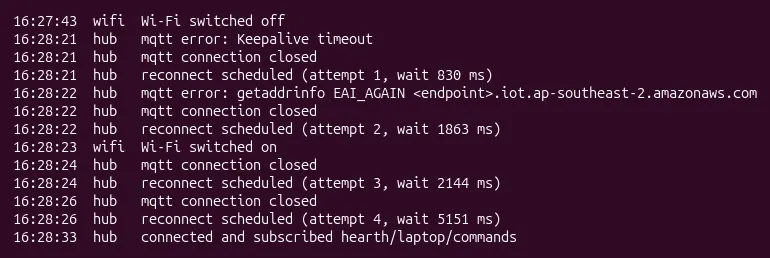
Before calling it done, I tested the two failures I was most likely to cause myself. I rebooted the laptop and asked straight away: the hub was connected seven seconds before I’d even logged in, and it answered the first question. Then I switched the Wi-Fi off and on. The hub noticed the dead connection about 40 seconds later, and was back ten seconds after the Wi-Fi returned.
Running all the time does cost something. The model sits in the GPU’s memory, using about 2GB of its 4GB, and the GPU stays powered. That’s fine on the charger and not great on battery. The hub itself is tiny, about 170MB of memory and almost no CPU. So there’s now one command to turn everything off, and it stays off until I turn it back on.
It doesn’t run while the laptop is asleep. Closing the lid puts everything to sleep, and Alexa gives the honest “might be offline” answer. That’s fine for now. If this becomes a real hub, it will need to live somewhere plugged in with the lid open, or on different hardware.
Try it yourself
The code is on GitHub at github.com/Mayuresh1m2/MySmartHome, with a README that walks through deploying it into your own Amazon and AWS accounts. You’ll need an AWS account, an Amazon developer account (the same login as your Echo), and a machine at home to run the hub. A GPU helps, but the keyword fallback works without one.
Deploying it creates:
- An Alexa skill in development. It’s never published, so it only works on the Echo devices signed in to your own Amazon account. Nobody else can find it or use it, and Amazon doesn’t charge for it.
- One Lambda function, the skill itself. It runs only when you talk to it, which keeps it well inside Lambda’s free tier.
- An IoT Core “thing” for your hub, with a certificate made from a key that never leaves your machine, and a policy that allows exactly two topics: commands in, replies out.
- A small DynamoDB table that holds each reply for five minutes, and a rule that writes replies into it. Both are pay per request.
- Logs kept for 14 days, an alarm that emails you when the skill errors, and a small dashboard.
- Two kill switches, at $1 and $5 a month by default, that cut the cloud side off without deleting anything.
None of this should be expensive. Everything is pay per use, and a few questions a day is close to nothing. The one thing running all the time is the hub’s connection: a month of it is about 44,000 connection minutes, and IoT Core charges $0.08 per million. AWS’s first two budgets with actions are free, as are the first three dashboards and ten alarms.
The networking is cheap too, because there isn’t much of it. There’s no load balancer, no API gateway, no NAT gateway and no VPC to pay for, and no port to open on your router, because the hub dials out. The real running cost is the machine at home staying on. So far my AWS bill for all of this is $0.00.
What’s next
This was the plumbing. The point of the hub was always the devices on my network. In order:
- Ramesh dude, clean my house. The robot vacuum is the first real device. I want to say “Alexa, ask ramesh dude to clean my house”, hear him reply with something like “Fine, fine. Calling in the cleaning crew”, and then hear the vacuum start up somewhere in the house.
- A nickname for every device. If the hub is called Ramesh dude, the rest of the house deserves names too, and he’ll answer like he’s handing the job to a colleague. Each name has to pass the same phone voice-mode test as his did, or Alexa won’t know who I’m talking about.
- See what my devices send out. The part I’m most curious about: which devices at home are talking to servers outside, where, and how often.
The rule from the start still holds. The hub can reach my devices, and nothing outside can reach the hub.